Visual Fan-Out: Make Your Products and Destinations Discoverable in AI Mode
Visual Fan-Out is the shift from “searching for an image” to “searching through an image.” In Google AI Mode, an image is treated as a scene: objects and attributes are detected, the intent is decomposed, and multiple related queries run in parallel to produce grounded results.

We have spent the last year talking about query fan-out (and to be honest, we still are): the moment when Google’s AI Mode takes a single question, decomposes it into sub-questions, runs many searches in parallel, then synthesizes an answer with links. Google describes this explicitly as issuing “multiple related searches concurrently across subtopics and multiple data sources.”
But the inflection point is not only text, it’s multimodality.
Google AI Mode is now multimodal: you can snap a photo or upload an image, ask a question about what you see, and AI Mode responds with a rich answer and links. Under the hood, Google says it uses Lens to identify objects and then applies the same query fan-out technique to issue multiple queries about the image as a whole and the objects within it.
That combination creates what we call Visual Fan-Out.
It is the shift from “searching for an image” to “searching through an image.” A single picture becomes a branching tree of intents: objects, attributes, styles, and actions. If you care about eCommerce, travel, and any experience where users decide with their eyes first, this is the new architecture of AI discovery.
To make this concrete (and to make the invisible visible), I built a Visual Fan-Out Simulator: a prototype that takes an image, decomposes it into candidate intents, fans out parallel searches, and shows you the branching structure as a navigable tree.
Try the Visual Fan-Out Simulator
This post is easier to understand if you can see the branching structure live. Below I embedded my Visual Fan-Out Simulator, a prototype that turns a single image into an explorable tree of intents: it decomposes the scene into entities and attributes, fans out parallel searches, then grounds and prunes branches so you only see actionable paths.
Google has also introduced Agentic Vision capabilities in Gemini 3 Flash, which suggests we should expect broader adoption of multimodal experiences across the board.
From keywords to scenes: what changed in AI Mode
Google’s public documentation and product posts give us a reliable baseline:
- AI Mode uses query fan-out to run multiple related searches concurrently and then synthesize a response.
- AI Mode is now multimodal and can “understand the entire scene” in an image, including objects, materials, colors, shapes, and how objects relate to one another.
- After Gemini 3.0 Flash identifies objects, AI Mode issues multiple queries about the image and the objects within it using query fan-out.
So the image is not treated as a single blob. It is treated as a scene with multiple candidate entry points.
If you want a mental model, think of a scene as a graph:
- Nodes: objects (chair), attributes (leather), styles (mid-century), contexts (living room), actions (buy, compare, book, navigate).
- Edges: relations (chair-in-room, lamp-next-to-chair), similarity (style-near-style), intent transitions (identify → compare → purchase).
This is why Visual Fan-Out is fundamentally a graph problem, which is exactly where the Reasoning Web framing becomes useful.
Visual Fan-Out: the pipeline (decompose → branch → ground → synthesize)
“Visual Fan-Out” is a pattern that emerges when you combine multimodal understanding with fan-out retrieval. Google does not publish all internal implementation details, so treat the following as an engineering interpretation anchored in what Google does describe publicly.
1) Visual decomposition: turning pixels into candidate intents
Visual Fan-Out starts by extracting multiple “handles” from the scene:
- primary subject(s)
- secondary objects
- attributes (materials, colors, patterns)
- relationships (layout, composition)
- style cues (vibe, era, aesthetic)
Google explicitly says AI Mode can understand objects and their materials, colors, shapes, arrangements, and that Lens identifies each object.
This is not just “generate a caption.” It is “generate a set of clickable hypotheses.”
2) Parallel branching: fan-out across objects, attributes, and styles
Once you have candidate intents, the system can branch:
- Identify the product (exact match)
- Find similar products (approximate match)
- Interpret the style (aesthetic match)
- Provide supporting context (history, care, compatibility)
- Move to action (where to buy, price, availability, nearby stock)
Google’s AI Mode, in general, runs many queries concurrently across sources.
In the multimodal case, Google says it issues multiple queries about the image and objects within it.
3) Grounding: pruning branches that do not map to reality
A visual system that hallucinates is useless for commerce.
Google’s shopping experience in AI Mode is explicitly backed by the Shopping Graph, which Google describes as having more than 50 billion product listings, with 2 billion updated every hour.
That matters because it enables a simple rule: only show branches that can be grounded to real inventory, real places, real entities.
4) Synthesis: answering with links, then inviting the next hop
Finally, AI Mode synthesizes a response and provides links for exploration.
Crucially, Google also notes that AI Mode queries are often longer and used for exploratory tasks like comparing products and planning trips.
This is not a single answer. It is an interactive reasoning loop.
Why Visual Fan-Out is a big deal for eCommerce
Discovery becomes multi-object, not single-product
In a visual-first journey, the user rarely wants “the thing.” They want the set:
- the chair and the lamp
- the outfit and the shoes
- the backpack and the hiking poles
- the sunglasses and the helmet that matches the vibe
Visual Fan-Out makes that natural: a scene decomposes into multiple purchasable nodes.
“Vibe” becomes queryable
A growing fraction of commerce intent is aesthetic. AI Mode can move from “what is this object” to “what is this style” because style cues are present in the image and can become branching intents.
You can already see this direction in Google’s own description of AI Mode shopping results: if you ask for visual inspiration, you get shoppable images; if you ask to compare, you get a structured comparison.
Grounding favors structured merchants
Here is the uncomfortable part:
If your product exists only as a flat JPEG and a vague title, you have fewer “hooks” when the system decomposes a scene. If your product is described with machine-readable attributes (material, color, pattern, size, GTIN, offers, availability), you become a better candidate for a branch that needs grounding.
This is where structured data stops being “rich results” and becomes retrieval infrastructure.
Why Visual Fan-Out matters for travel (and every place-based experience)
Travel is inherently visual: rooms, views, landmarks, beaches, trailheads, museums, restaurants.
Google explicitly positions AI Mode for complex tasks like planning a trip.
And Google has been extending visual search beyond static images into video questions, which is a natural accelerator for travel and local discovery.
A single travel photo can fan out into:
- “Where is this?”
- “Best time to visit”
- “Similar places”
- “How do I get there from here?”
- “Book a hotel like this”
- “What is the hike difficulty?”
- “What are the rules, permits, safety constraints?”
In the Reasoning Web framing: the picture is not content, it is an entry point into a context graph that the agent can traverse.
A quick note on the research trend: decomposition is becoming standard
Even outside Google, the entire multimodal field is moving toward region and slice-based perception because a single global view is not enough for real scenes.
A few examples worth highlighting:
- SAM 2 (Segment Anything Model 2) pushes promptable segmentation for images and videos, with real-time streaming memory for video processing. This matters because segmentation is the cleanest bridge from pixels to “things you can reason about.”
- LLaVA-UHD introduces an “image modularization strategy” that divides native-resolution images into variable-sized slices, then compresses and organizes them with spatial structure for an LLM. This is basically decomposition as an input primitive.
- HiRes-LLaVA (CVPR 2025) focuses on the downside of naive slicing (“context fragmentation”) and proposes mechanisms to preserve global-local coherence across slices. This is important because Visual Fan-Out must keep the whole scene coherent while exploring parts.
The take here is that: whether you call it region-aware encoding, slicing, or segmentation, visual decomposition is becoming the default strategy for systems that must reason over real-world images.
Introducing my Visual Fan-Out Simulator
I built the simulator for one reason: the conversation about AI Mode often stays abstract. “Fan-out” sounds like a metaphor until you can see the branching structure.
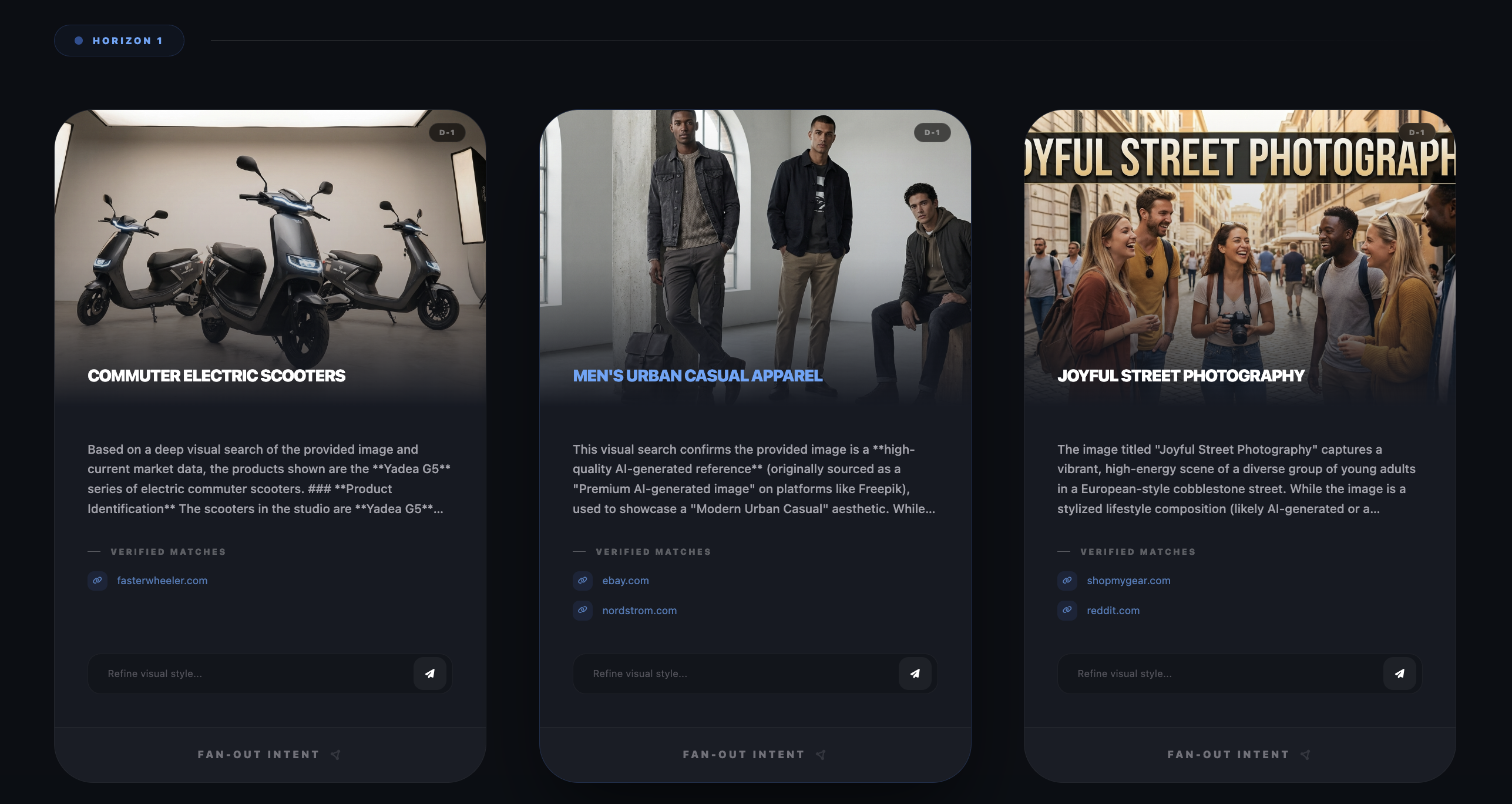
What the simulator does
- Decomposes an input image into candidate entities and intents (objects, attributes, style cues).
- Builds a tree of next-step questions that a user is likely to ask, even if they did not type them.
- Executes branches in parallel (where possible), so the experience feels like a mind map unfolding rather than a linear workflow.
- Grounds each branch by attaching verified sources (product pages, guides, booking pages, references), then prunes dead ends.
- Persists context across depth, so the original image remains the root memory even after multiple hops.
If you want to describe it in one line:
It turns an image into an explorable context graph.
Why I call it a “simulator”
Because it is not trying to replicate Google’s internal stack. It is simulating the interaction pattern that Google publicly describes: multimodal scene understanding plus query fan-out across multiple sources.
Feature mapping (prototype → real-world pattern)
- Visual Decomposition → object identification + scene understanding (Lens + multimodal model)
- Parallel Branching → query fan-out issuing multiple related searches concurrently
- Verified Matches → grounding against authoritative inventories and sources (Shopping Graph for commerce)
- Tree Memory → persistent context across multi-step exploration (what users experience as “I can keep refining”)
What this means for SEO in the Reasoning Web
In classic SEO, we optimized documents to rank for queries.
In AI Mode, especially with Visual Fan-Out, we are increasingly optimizing for paths:
image → entity → attributes → constraints → action
Your job is to make sure that when the system decomposes a scene, it can reliably attach your content (and your products) to the right node in the graph.
Practical checklist for eCommerce and travel teams
- Make entities explicit
Product, brand, place, lodging, attraction, itinerary item. Use Schema.org markup that matches what users see. - Enrich attributes that matter visually
Materials, color, pattern, style, size, compatibility, seasonality. These are the hooks Visual Fan-Out branches on. - Connect images to entities, not just pages
Treat images as first-class objects (ImageObject) and link them to the entity they represent. - Ensure “actionability” is machine-readable
Offers, availability, price, inventory, return policy for commerce. Booking details, location, opening hours, policies for travel. - Build internal graph cohesion
Strong internal linking and consistent identifiers help the agent traverse your site like a graph, not a list of URLs.
Google’s own guidance still says there are no special optimizations required beyond good SEO fundamentals, but it also explicitly calls out structured data alignment and high-quality images as important.
The difference today is why those fundamentals matter: they are no longer only for ranking, they are for being selectable during decomposition and grounding.
Closing: Visual Fan-Out changes the unit of search
Google Lens alone processes visual searches at massive scale, with reporting citing tens of billions per month.
Add AI Mode’s multimodal fan-out, and the unit of search is no longer the query string.
It is the scene.
Visual Fan-Out is how agents turn a scene into a plan: decompose, branch, verify, synthesize, then invite the next hop.
And that is the Reasoning Web in practice: not a bigger prompt, but an explorable context graph where meaning is navigated, not retrieved. If you are building for eCommerce, travel, or any visual-first journey, the question is simple:
When AI Mode decomposes your customer’s world, will your products and pages be the obvious nodes to pick?
References
- Google Search, “Expanding AI Overviews and introducing AI Mode” https://blog.google/products-and-platforms/products/search/ai-mode-search/;
- Google Search, “Bringing multimodal search to AI Mode” https://blog.google/products-and-platforms/products/search/ai-mode-multimodal-search/;
- Google Search Help, “Get AI-powered responses with AI Mode in Google Search” https://support.google.com/websearch/answer/16011537;
- Google Search PDF, “AI Overviews and AI Mode in Search” https://search.google/pdf/google-about-AI-overviews-AI-Mode.pdf;
- Google Shopping, “Shopping on Google: AI Mode and virtual try-on updates” https://blog.google/products-and-platforms/products/shopping/google-shopping-ai-mode-virtual-try-on-update/;
- Google Shopping, “Let AI do the hard parts of your holiday shopping” https://blog.google/products-and-platforms/products/shopping/agentic-checkout-holiday-ai-shopping/;
- Vertex AI Docs, “Grounding overview” https://docs.cloud.google.com/vertex-ai/generative-ai/docs/grounding/overview;
- Vertex AI Docs, “Grounding with Google Search” https://docs.cloud.google.com/vertex-ai/generative-ai/docs/grounding/grounding-with-google-search;
- Vertex AI Docs, “Vertex AI RAG Engine overview” https://docs.cloud.google.com/vertex-ai/generative-ai/docs/rag-engine/rag-overview;
- Google DeepMind, “Introducing Agentic Vision in Gemini 3 Flash” https://blog.google/innovation-and-ai/technology/developers-tools/agentic-vision-gemini-3-flash/;
- WordLift, “Query Fan-Out: A Data-Driven Approach to AI Search Visibility” https://wordlift.io/blog/en/query-fan-out-ai-search/.